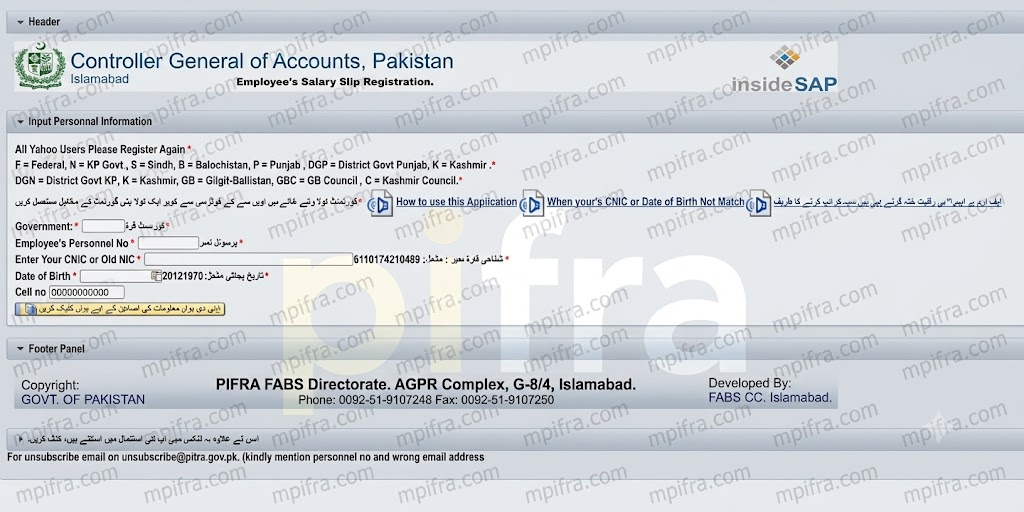
The PIFRA Registration Form helps eligible government employees register an email address to receive salary slips electronically. The Accountant General Pakistan Revenues (AGPR) lists an Email Registration Form under its online services for salary slips and pension slips.
This guide explains how to access the official registration service, what to check before submitting the form, and what to do if you encounter a problem.
Access the Official PIFRA Registration Form
Use the following official links:
- AGPR official website: https://www.agpr.gov.pk/
- PIFRA salary slip registration: https://m.pifra.gov.pk/salaryslip_emp
For additional confidence, you can visit the AGPR website first and locate Online Service → Email Registration Form. This helps you reach the service through the government accounts website rather than relying on a third-party page.
Before entering information, check that the address bar shows the official m.pifra.gov.pk domain.
How to Register for PIFRA Salary Slips
Step 1: Open the AGPR website
Visit https://www.agpr.gov.pk/ and look for the Online Service section. Find the link labelled Email Registration Form.
Step 2: Open the registration service
Select the registration link. It should open the PIFRA salary slip registration form on the official PIFRA website.
Step 3: Read the live form carefully
The fields displayed by the official portal are the authoritative guide to what information is required. Enter details only in the fields requested by the form, using information that matches your official employment record.
Do not assume that every employee must enter the same details if the form or departmental process differs.
Step 4: Use an accessible email address
AGPR’s service description specifically mentions an email registered with Gmail. Follow the instructions displayed on the live form and use an email account that you can access. Do not assume that every email provider is accepted unless the portal confirms it.
Step 5: Review your information
Before submitting, carefully check each field. Correct any typing mistakes and make sure you have not entered another employee’s information.
Step 6: Submit the form
Submit the registration only after reviewing the information. Follow any confirmation or error message shown by the official portal. Save a reference or confirmation message if one is provided.
Step 7: If registration does not work
If the form displays an error, does not accept your details, or you do not receive salary slips after registration, contact your department’s Drawing and Disbursing Officer (DDO) or relevant Accounts Office for guidance. Avoid repeatedly submitting different personal details to try to bypass an error.
What Information Is Required?
The exact fields should be confirmed from the live official form. Do not rely on an unofficial checklist that claims every employee must provide a particular combination of CNIC, employee number, government code, district, designation, mobile number, or office information.
Enter only the information requested by the official portal. Never share your password, verification code, or sensitive employee information with an unofficial website.
Is PIFRA Registration Free?
AGPR lists the email registration form as an online service. If you are asked to pay an unofficial website or agent simply to access the form, verify the request with your Accounts Office before proceeding.
Why Might Salary Slips Not Arrive?
Possible issues include an incorrectly entered email address, a message being filtered into Spam or Junk, a registration problem, or an issue that needs attention from the relevant payroll office. These are troubleshooting possibilities, not a guarantee that any one issue applies to your case.
Check your email folders first. If the problem continues, contact your DDO or Accounts Office and explain what the official portal displayed.

Frequently Asked Questions
Where is the official PIFRA registration form?
You can reach it through the AGPR website’s Email Registration Form service or visit https://m.pifra.gov.pk/salaryslip_emp.
Can I use any email address?
AGPR’s service description mentions an email registered with Gmail. Follow the current form’s instructions rather than assuming that every email provider is accepted.
Does submitting the form guarantee monthly salary slips?
Submission alone does not establish that registration has been completed successfully. Follow the portal’s confirmation instructions and contact your Accounts Office if salary slips do not arrive.
What should I do if the form shows an error?
Read the error message and check the information you entered. If the issue remains, ask your DDO or Accounts Office for help rather than repeatedly submitting unverified details.
Conclusion
The safest way to register for PIFRA salary slips is to access the service through the official AGPR website or the PIFRA government portal. Follow the fields and instructions currently displayed, review your information before submission, and seek help from your Accounts Office if the registration cannot be completed.
Portal instructions can change, so always treat the live official form as the final reference for the current registration process.