
Planning for retirement becomes easier when you understand how your pension may be calculated. For federal and provincial government employees in Pakistan, the expected pension can depend on qualifying service, pensionable pay, retirement category, applicable pension rules, and any deductions or adjustments allowed under the relevant regulations.
The Pakistan Government Pension Calculator on MPifra.com is designed to help employees explore their estimated retirement benefits before submitting their pension papers. Instead of relying entirely on manual calculations, you can use a calculator to understand the figures involved and identify details that may need confirmation from your department.
Whether you work under a federal department, deal with AGPR-related accounts, or serve in Khyber Pakhtunkhwa (KPK), start by checking which pension rules apply to your employment. Different departments and employee categories may be subject to different provisions, so one calculation method should not automatically be treated as suitable for everyone.
What Can You Learn From a Pension Estimate?
A pension estimate gives you an initial idea of the financial benefits you may receive after retirement. Depending on the calculator’s features and the information entered, it may help you examine:
- Estimated gross pension: The pension figure calculated before applicable deductions or adjustments.
- Monthly pension after commutation: An estimate of the amount remaining if part of the pension is exchanged for a lump-sum payment under applicable rules.
- Commutation estimate: A projected one-time payment, where commutation is available and the relevant factors are known.
- Qualifying service: The service period that may be counted under the applicable pension regulations.
- Potential pension adjustments: An illustration of increases or other adjustments, provided the correct rules and effective dates have been applied.
These figures should be viewed as planning estimates rather than a final sanction. Your department’s service record, pay history, retirement notification, and applicable regulations can affect the amount ultimately approved.
How Is Government Pension Calculated in Pakistan?
Pension calculations generally involve pensionable emoluments and qualifying service. However, the precise formula, applicable pay period, service limits, and other factors must be taken from the rules relevant to the employee.
A simplified illustration of a traditional pension calculation is:
Illustrative gross pension = Pensionable emoluments × Qualifying service factor
This is a conceptual explanation, not a complete official formula. The actual calculation may use a prescribed divisor, service cap, or another method specified by the applicable rules. Do not use this simplified expression to determine an official entitlement.
Before entering your details, confirm the following:
- Which pension scheme applies to your appointment?
- Which pay figure is recognized as pensionable for your retirement?
- How much of your service qualifies for pension?
- Which retirement date and retirement category apply?
- Are any special provisions relevant to your department or employment status?
These checks matter because entering the wrong pay amount or service period can produce a result that looks precise but is not reliable.
How to Use the Pension Calculator on MPifra.com
Follow these steps to prepare an initial estimate.
Step 1: Confirm Your Employment Category
Identify whether your service falls under a federal department or the relevant provincial government. If the calculator offers separate categories, select the one matching your employment. Do not choose a category simply because it produces a higher estimate.
Step 2: Enter Your Service Dates
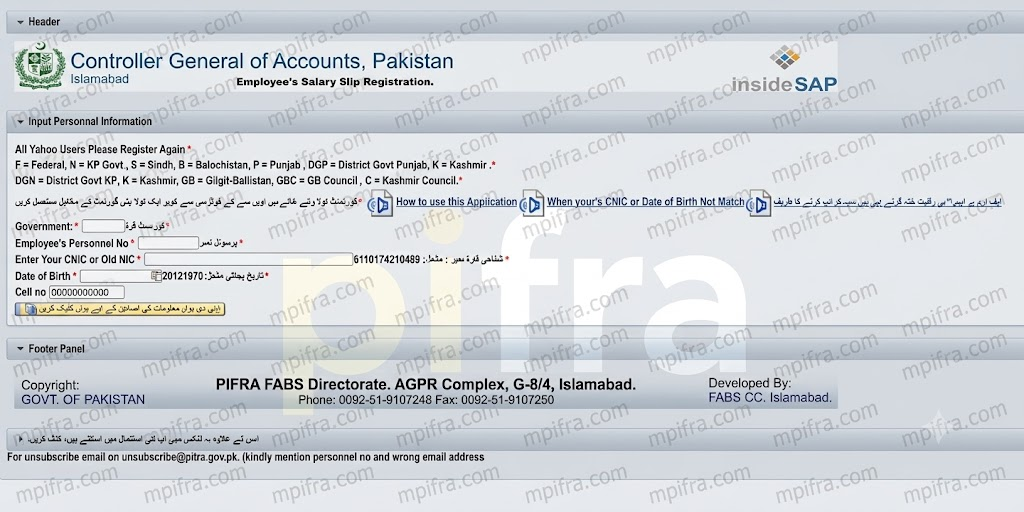
Use the dates recorded in your official employment documents. Depending on the calculator, you may need your date of appointment, date of birth, and expected retirement date.
Review the calculated service period carefully. Breaks in service, qualifying-service conditions, and department-specific provisions may affect the service credited for pension purposes.
Step 3: Add Your Pay Information
Enter the requested basic pay and any additional pay components only where the calculator explicitly supports them. Not every allowance is necessarily pensionable. Check your pay slip, pay-fixation documents, and applicable departmental rules before including an allowance in your estimate.
If you are unsure whether a payment counts toward pensionable emoluments, leave the assumption unconfirmed and ask your accounts office.
Also Read More About: PIFRA HBA Status Check Online: House Building, Car & Bike Advance
Step 4: Review Commutation Options
Some pension arrangements allow an eligible employee to exchange a prescribed portion of pension for a lump-sum payment. The amount depends on the applicable rules and calculation factors, which may include age and an official commutation table.
Commutation can reduce the monthly pension payable for a period determined by the relevant rules. Before making a decision, compare the estimated lump sum with the effect on your regular income. Do not assume that a particular percentage or restoration period applies to every employee.
Step 5: Examine Every Result
Read the individual figures rather than focusing only on the final monthly amount. Check the gross pension, any commutation deduction, and any other adjustment shown by the tool. If the calculator provides a print option, save the estimate for your personal planning records.
You can then compare the assumptions with your official service and pay documents.
Federal, AGPR and KPK Pension Information
Employees often search for separate pension guidance because their accounts and administrative processes may involve different offices. AGPR-related services are associated with federal government accounts, while provincial employees may need to consult the relevant provincial accounts authority and departmental office.
However, an office or payroll system does not by itself determine every pension rule. Your employment category, applicable pension scheme, and relevant government notifications remain important.
For a more dependable estimate, use official documents to verify any annual pension increase, eligibility requirement, commutation provision, family-pension entitlement, or change in calculation method. Where a rule has changed, make sure the effective date matches your retirement circumstances.
Information to Gather Before Retirement
Preparing your documents in advance can make it easier to check a pension estimate and resolve discrepancies.
Consider organizing the following records, as applicable to your case:
- Appointment and service-record documents.
- Recent pay slips and relevant pay-fixation records.
- Verified qualifying-service details.
- Expected retirement date and retirement category.
- Applicable pension rules or official notifications.
- Departmental guidance about commutation and any other relevant benefits.
Keep personal documents secure. You do not need to publish your CNIC number, employee number, salary slip, or other confidential information in website comments to ask a general pension question.
Example: Why Your Inputs Matter
Imagine two employees who have worked for a similar number of years but have different pensionable pay figures. Their estimated pensions may differ because the calculation depends on more than service duration alone.
Likewise, an employee who enters total service instead of qualifying service may obtain a different result from one based on the verified service record. An incorrectly included allowance can also change the estimate.
This is why the calculator should be used alongside document checks. A useful estimate is not simply a number on the screen; it is a number based on clearly identified assumptions that can be reviewed and corrected.
Frequently Asked Questions
MPifra.com provides online informational tools and guidance. Unless a tool is explicitly operated by the relevant government authority, do not treat its output as an official pension sanction or approval.
They may be able to use the same tool for an initial estimate if it supports their respective categories. However, the applicable pension scheme and rules should be confirmed before relying on the result.
No. The result is an estimate based on the information and calculation method used. The authorized department or accounts office determines the pension entitlement after reviewing the official record and applicable rules.
Eligibility and permitted commutation arrangements depend on the rules applicable to the employee. Confirm the current provisions before making financial plans based on a lump-sum payment.
Check your service period, pensionable pay, retirement category, and calculation assumptions first. If the difference remains, request a written explanation from your department or accounts office and ask which rules were applied.
Yes, as a preliminary planning aid. It is sensible to consider a range of possible outcomes until your official pension calculation is confirmed. Avoid making major financial commitments based solely on an online estimate.
Plan Ahead With Better Information
Retirement planning is easier when you understand the figures behind your expected pension. Use the pension calculator on MPifra.com to explore an initial estimate, review your service and pay details, and identify questions that need an official answer.
For the most useful result, enter accurate information, check the assumptions behind each calculation, and verify current pension provisions with your department or authorized accounts office. A calculator can help you prepare, but your verified service record and the applicable government rules remain the foundation of your final pension entitlement.
Disclaimer: This article and any related calculator are intended for general information and preliminary planning. Pension rules can vary by employment category, scheme, department, and effective date. Verify all calculations and entitlements with the relevant government department or authorized accounts office before making financial decisions.